Data Analyst Agent: Reducing Ad-hoc Requests by 40% with LangGraph
By Phong Trang - Data Platform Product Manager - thanhphong.trang@gmail.com
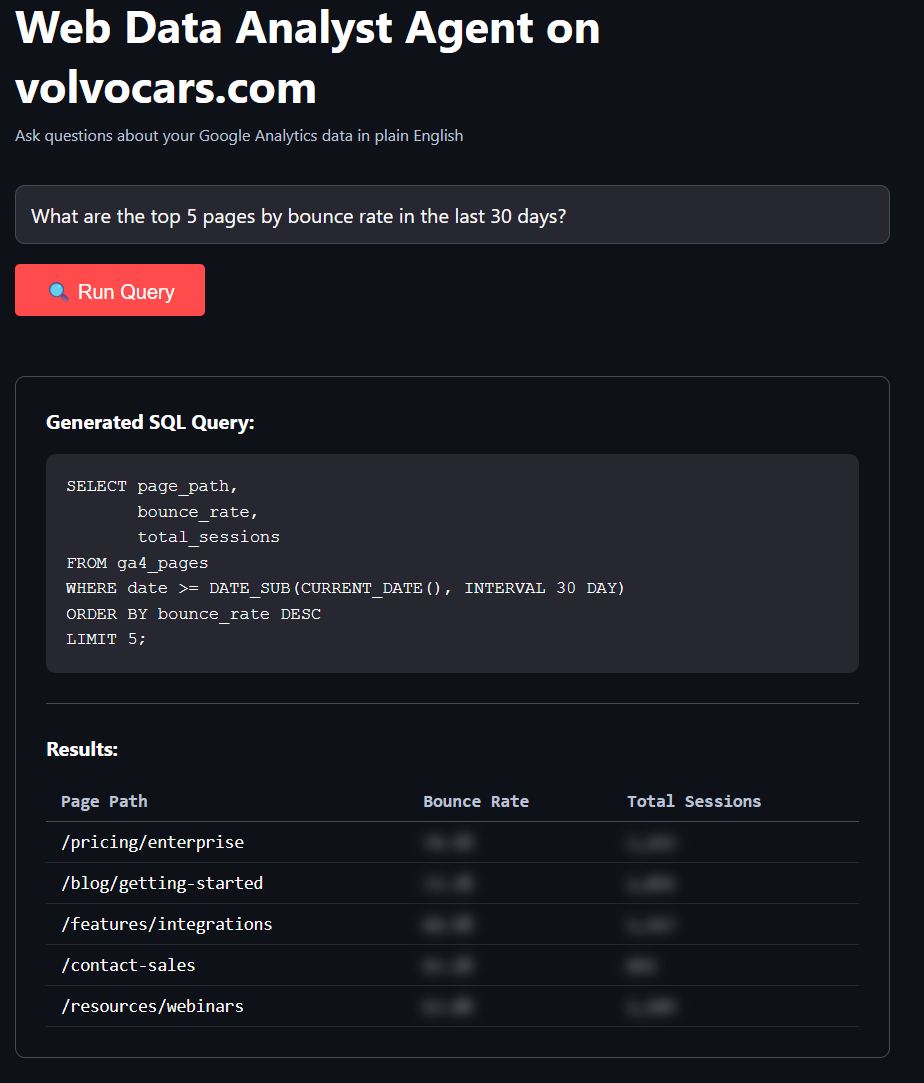
ℹ️ Executive Summary
- Role: Product Manager | Industry: Web Analytics & Data Platform
- Key Impact:
- 40% reduction in ad-hoc data requests within 30 days
- Saved ~50 hours/month of analyst time for strategic work
- 85% accuracy on automated query types (behavioral analytics, conversion metrics)
- ROI positive from week 2 of deployment
- Technical Stack:
- Timeline: 5 days POC development, 1 month pilot validation


🎯 The Problem: Drowning in Data Requests
Our web analytics team received 30-50 ad-hoc data requests weekly from product managers, marketers, and executives. Most were variations of the same questions:
- "What's our conversion rate for feature X?"
- "Which pages have the highest bounce rate?"
- "What's the trend of user engagement over the past quarter?"
Analysts spent 60% of their time writing SQL queries and formatting results instead of generating insights. Stakeholders waited 2-3 days for answers to simple questions.
Why This Matters
The cost wasn't just about time but it also include opportunity cost. While analysts manually queried data, they couldn't:
- Identify growth opportunities
- Build predictive models
- Design experiments
- Create strategic recommendations
💡 The Approach: POC First, Perfect Later
Instead of building a comprehensive self-service analytics platform (6+ months), I chose a targeted proof-of-concept to validate demand and learn fast.
Why a POC?
| Decision | Rationale |
|---|---|
| Validate demand | Test if automation truly reduces requests before large investment |
| Learn failure modes | Discover edge cases in controlled environment |
| Build trust | Quick wins with stakeholders before expanding scope |
| Constrained domain | Google Analytics only which features stable schema, predictable queries |
🏗️ Technical Architecture: The State Graph Workflow
The workflow represents a deliberate design philosophy: explicit control flow over black-box automation.
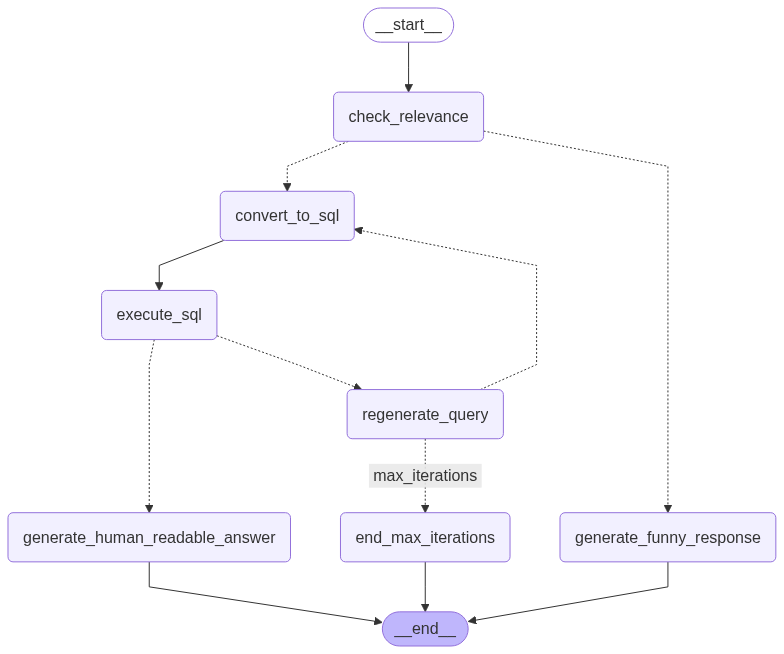
Why This Flow?
The graph structure addresses three critical requirements:
1. Viability: Not Every Question is a Data Question
Early testing revealed users asked off-topic questions like "How do I reset my password?" or "Why is the site slow?"
Solution: The check_relevance node routes non-data questions to generate_funny_response instead of failing ungracefully.
Design Decision: Separate routing for irrelevant questions prevents wasted API calls and provides better UX than generic error messages.
2. Implementation Feasibility: Error Recovery is Not Optional
LLMs generate syntactically correct but semantically wrong SQL. The first version crashed on:
- Wrong date formatting (
DATE()vsDATETIME()) - Non-existent columns (hallucinated field names)
- Division by zero in aggregations
Solution: The regenerate_query loop captures errors, passes them back to the LLM with context, and retries up to 3 times.
Key insight: LLMs can fix their own mistakes if you show them the error. 60% of failed queries succeeded on retry.
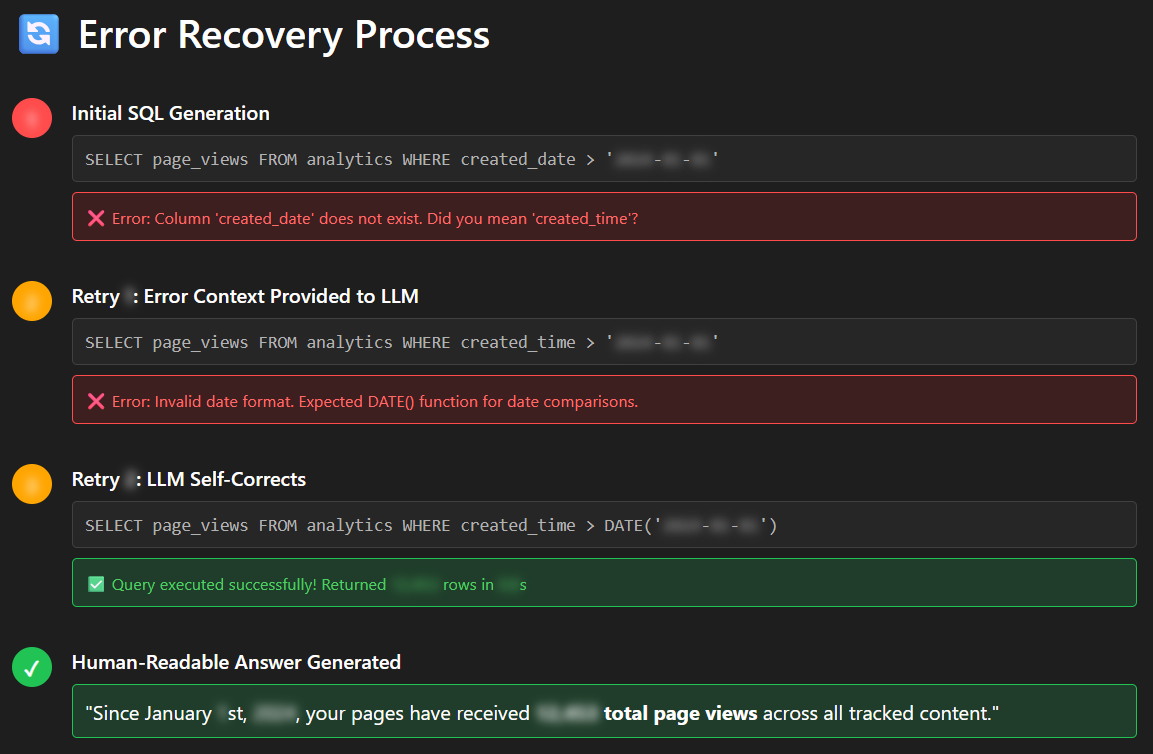
LangGraph's error recovery workflow in action. When the LLM generates incorrect SQL (wrong column names or date formatting), the agent captures the database error, feeds it back to the LLM with context, and successfully auto-corrects within 3 retry attempts at 60% success rate on retry.
3. Cost Control: Prevent Infinite Loops
Without iteration limits, a malformed query could retry indefinitely, burning API credits.
Solution: The check_attempts_router enforces a maximum of 3 retries before routing to end_max_iterations.
✅ Success Path
Question → Relevance Check → SQL Generation → Execution → Human-Readable Answer
⚠️ Error Recovery Path
SQL Error → Capture Message → Regenerate with Context → Retry (max 3×) → Escalate if needed
💻 Key Technical Decisions (Product Manager Perspective)
Decision 1: LangGraph State Machine vs. Simple LLM Chain
As a PM, I needed observability into each workflow step to diagnose failures and measure performance.
from langgraph.graph import StateGraph, END
from state.agent_state import AgentState

# Define workflow with explicit state transitions
workflow = StateGraph(AgentState)

# Add nodes (tasks)
workflow.add_node("check_relevance", check_relevance)
workflow.add_node("convert_to_sql", convert_nl_to_sql)
workflow.add_node("execute_sql", execute_sql)
workflow.add_node("regenerate_query", regenerate_query)

# Add conditional routing (decision points)
workflow.add_conditional_edges("check_relevance", relevance_router, {
    "convert_to_sql": "convert_to_sql",
    "generate_funny_response": "generate_funny_response"
})

workflow.add_conditional_edges("execute_sql", execute_sql_router, {
    "generate_human_readable_answer": "generate_human_readable_answer",
    "regenerate_query": "regenerate_query"
})

# Compile and deploy
app = workflow.compile()
Why This Matters (PM View)
- Debuggability: I can see exactly where failures occur (relevance check? SQL generation? execution?)
- Metrics: Track retry rates, error types, and success paths for continuous improvement
- Flexibility: Easy to add new nodes (e.g., caching, query optimization) without rewriting the entire flow
Decision 2: Azure OpenAI for Enterprise Compliance
Security and compliance were non-negotiable for handling proprietary business data.
import os
from dotenv import load_dotenv
from openai import AzureOpenAI

# Azure OpenAI setup with enterprise controls
client = AzureOpenAI(
    api_key=os.getenv("AZURE_OPENAI_API_KEY"),
    api_version="2024-02-15-preview",
    azure_endpoint=os.getenv("AZURE_OPENAI_ENDPOINT")
)

def convert_nl_to_sql(state: AgentState) -> AgentState:
    """Convert natural language question to SQL query"""
    prompt = f"""Given this database schema:
{state['schema']}

Convert this question to SQL:
{state['question']}

Rules:
- Use DATE() for date comparisons
- Include query explanation as comment
- Limit results to 1000 rows max
"""

    response = client.chat.completions.create(
        model="gpt-4",
        messages=[{"role": "user", "content": prompt}],
        temperature=0.1  # Low temp for deterministic SQL
    )

    state["sql_query"] = response.choices[0].message.content
    return state
Why This Matters (Business Perspective)
| Requirement | Azure OpenAI Solution | Alternative Risk |
|---|---|---|
| Data privacy | No model training on our queries | Direct OpenAI trains on enterprise data |
| Compliance | EU data residency, GDPR compliant | 6+ months compliance review for other providers |
| Cost | ~20% premium, but approved vendor | Cheaper options delay project by months |
Trade-off accepted: Azure OpenAI costs ~$45/month vs. $35 for direct OpenAI, but compliance overhead of using non-approved providers would have delayed deployment by 4-6 months.
📊 Results: One Month Pilot Validation
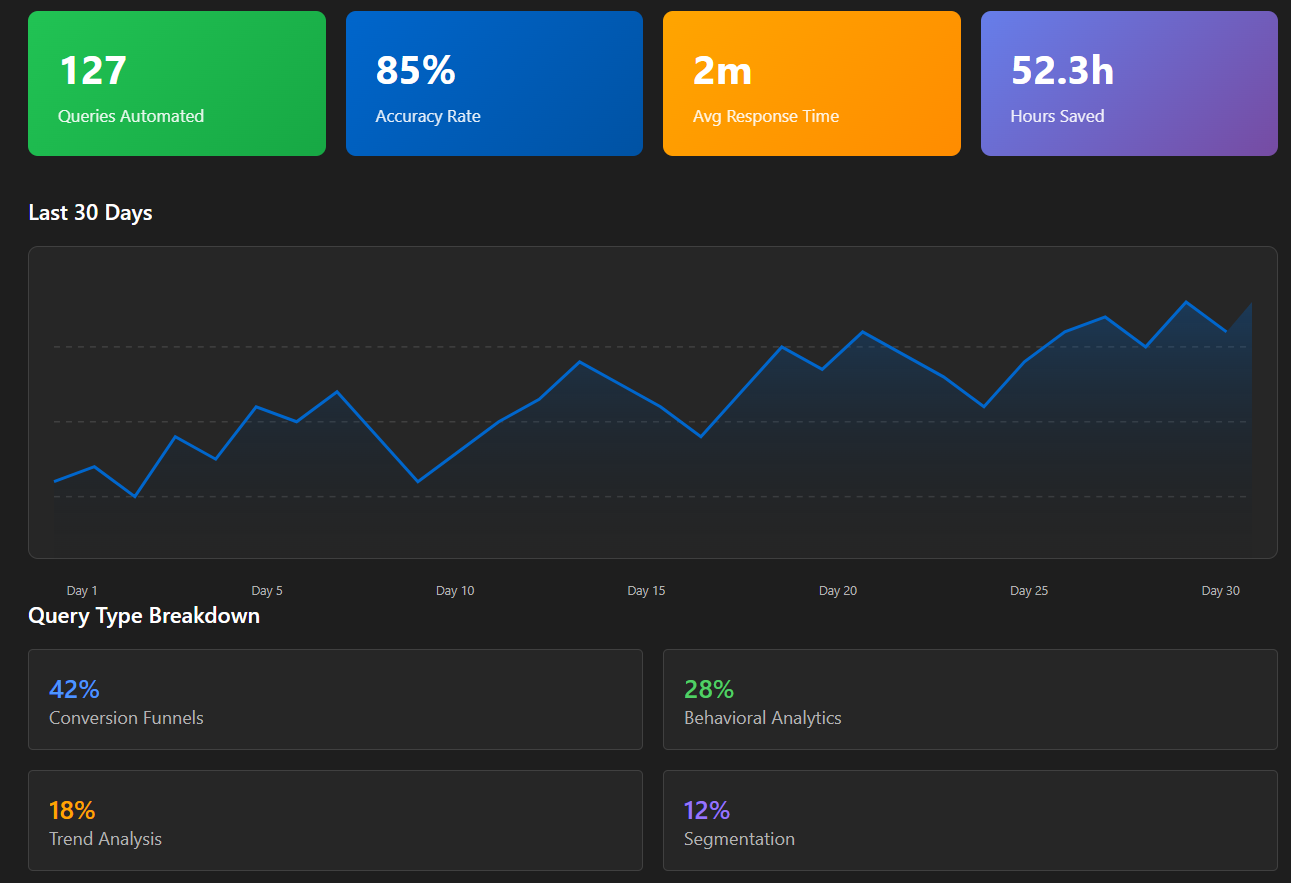
Query Coverage: 40% Automation Rate
✅ Handled Query Types (40%)
- Conversion funnels: "What's our signup-to-purchase rate?"
- Behavioral analytics: "Which pages have highest engagement?"
- Trend analysis: "How has bounce rate changed over time?"
- Segmentation: "Compare mobile vs. desktop users"
❌ Not Handled (60%)
- Complex multi-table joins with business logic
- Queries requiring data outside GA warehouse
- Questions needing interpretation or judgment
- Ad-hoc data collection or instrumentation requests
Time & Cost Impact
| Metric | Manual Process | Agent Automation | Improvement |
|---|---|---|---|
| Time per query | 45 minutes | 2 minutes | 96% faster |
| Queries handled (month 1) | — | 127 queries | — |
| Hours saved | — | ~50 hours/month | $2,500 value |
| Accuracy rate | 100% (manual) | 85% correct | 12% need review |
ROI Breakdown
Development Investment
- 3 days POC build + 2 days refinement = ~40 hours
Monthly Operational Cost
- Azure OpenAI API: $45 (GPT-4, ~127 queries × 3 calls avg)
- Streamlit hosting: $0 (internal server)
- Maintenance: ~2 hours/month (prompt tuning, schema updates)
Monthly Value: 50 hours saved × $50/hour = $2,500
Payback Period: <1 week
🎓 Key Learnings: AI is Good at Nodes, Humans Design Workflows
1. Constrained Domains are AI's Sweet Spot
The agent works because Google Analytics data is:
- Structured: Consistent schema across tables
- Documented: Clear field definitions and relationships
- Stable: Schema changes are infrequent and announced
- Predictable: Query patterns follow known business questions
Insight: Expanding to other data sources requires similar constraints. Ad-hoc, poorly documented databases would tank accuracy.
2. Transparency Builds Trust
Showing the generated SQL query (not just results) lets analysts:
- Verify correctness before trusting the output
- Learn query patterns for their own work
- Provide feedback to improve prompt engineering
Black-box "magic" would have faced resistance. Transparency turned skeptics into champions.
3. Error Handling is the Product
Most development time (60%) went to edge cases:
- Ambiguous questions ("What's performance?" → page load time? revenue?)
- Malformed SQL (wrong quotes, missing parentheses)
- Unexpected data types (comparing strings to dates)
- Timeout handling for expensive queries
The "happy path" was 20% of the work. Production-ready means handling failure gracefully.
4. Humans Still Design the Workflow
LLMs excel at individual tasks (SQL generation, formatting results), but cannot design the workflow:
- When to retry vs. escalate to human?
- How many retries before admitting failure?
- What error context to provide for regeneration?
- How to balance cost vs. accuracy?
The state graph represents human expertise about how data questions should be processed. AI fills in the nodes; I designed the edges.
🚀 What's Next: Scaling Beyond POC
Immediate (Month 2-3)
- Expand to conversion data warehouse (add e-commerce funnel queries)
- Add query history for pattern analysis and caching opportunities
- Implement feedback loop (thumbs up/down on results) for continuous improvement
Medium-term (Q2 2026)
- Multi-data-source queries: Join GA behavioral data + CRM customer data
- Scheduled reports: "Send me weekly engagement metrics every Monday"
- Slack integration: Ask questions directly in-channel without opening Streamlit
Long-term Considerations
- Fine-tuning: Train a custom model on our query patterns (if volume justifies cost ~$1000+)
- Caching layer: Store results for repeated questions (reduce API costs by ~30%)
- Access control: Role-based permissions (not all users should query all data)
🛠️ Skills Demonstrated
- Product Strategy: POC-first approach to validate demand before large investment
- Technical Leadership: Designed LangGraph workflow balancing complexity vs. maintainability
- Stakeholder Management: Built trust through transparency (showing SQL, not hiding it)
- Data Platform Architecture: Integration with Azure OpenAI, SQLAlchemy, GA4 data warehouse
- ROI Analysis: Measured time savings, cost efficiency, and payback period
- Iterative Development: Scoped to 40% of requests, not chasing 100% perfection
🤙🏻 Let's Connect
📧 thanhphong.trang@gmail.com
💼 LinkedIn Profile
Available for: Product Manager, Data Platform, AI/ML Product roles
Location: Gothenburg, Sweden
📂 Portfolio Artifacts
Code Repository Structure
/data-analyst-agent
│
├── graph/
│   └── main_workflow.py          # LangGraph state machine definition
│
├── routers/
│   └── main_routers.py           # Conditional routing logic
│
├── state/
│   └── agent_state.py            # State schema for workflow
│
├── tools/
│   ├── agent_tools.py            # Core functions (SQL gen, execution)
│   ├── sub_tools.py              # Utility functions
│   ├── schema_tools.py           # Database introspection
│   └── chart_tools.py            # Visualization generation
│
├── database_query_agent_ui.py    # Streamlit UI
├── requirements.txt              # Dependencies
└── .env.example                  # Configuration template
Code repository: not currently public.